
Conversational AI for employees refers to chat interfaces, virtual assistants, and agentic assistants that access HRIS records and policy documents to answer questions and take authorised actions. In practical terms this includes in-app chat, Teams/Slack bots and mobile assistants that return payslips, confirm leave balances or start approval workflows.
What we mean by ‘conversational’ vs ‘chatbot’ vs ‘agentic’
“Chatbot” often describes rules-driven flows for FAQs. “Conversational” assistants use NLP to understand intent, manage multi-turn dialog and provide context-aware answers. “Agentic” assistants go further: they can act on behalf of users (create tickets, start payroll corrections) and therefore require stronger governance and auditability.
Business outcomes are tangible: fewer routine HR tickets, faster resolution and higher employee satisfaction when assistants deliver accurate, source-cited answers. MiHCM maps to this stack: MiA ONE provides the conversational layer, SmartAssist orchestrates approvals and automated workflows, and MiHCM Data & AI with Analytics measures adoption and impact.
Operational expectation: conversational AI augments HR rather than replaces it. Success depends on governance, integration with canonical data sources and clear escalation paths to humans.
Quick wins, risks and what to pilot first

Quick wins for conversational AI for employees: automate payslip requests, leave balances, simple policy lookups and interview scheduling. These are high-volume, low-risk interactions that improve response time and user satisfaction.
Pilot recipe checklist: choose one use case; connect HRIS read-only; enable role-based access; run a 30–90 day pilot; measure resolution time and satisfaction.
Top risks: personal data exposure, model hallucinations, poor human handoff design and low adoption without UX and comms work.
KPIs from day one: ticket volume reduction, first-contact resolution (FCR), time-to-answer, assistant adoption rate and assistant NPS/CSAT.
Evidence shows 24/7 conversational self-service can reduce HR ticket volume and speed responses compared with manual channels; results vary by implementation. (Coursera, 2026), (IEEE).
Run a tight pilot: limit scope, log every interaction, sample human reviews weekly and iterate prompts and citations before scaling.
Quantifying engagement: what to measure
- Measure assistant NPS/CSAT and track active users per week to understand adoption trends.
- Monitor repeat queries to detect unclear responses or missing content.
- Track resolution time and first-contact resolution to quantify time saved for HR and employees.
Industry surveys from 2024–25 indicate rapid workplace uptake of AI tools and growing employee expectations for instant, automated help. For example, a government economic note and industry surveys document meaningful increases in AI use across workplaces in 2024. (Federal Reserve, 2024), (TDWI, 2024).
Personalisation matters: link answers to employee records (via read-only HRIS calls) so responses show context such as leave balance or pay period. Consistent, source-cited answers improve perceived fairness across teams and regions.
Use cases across the employee lifecycle

Conversational AI supports the full employee lifecycle. Below are practical examples that map to common HR processes.
- Onboarding: automated checklists, document collection reminders, role-specific FAQ and starter actions such as IT access requests and mandatory training enrolment.
- Day-to-day self-service: payslips, leave requests, timesheet corrections and payslip explanations delivered via chat with citations to payroll or policy documents.
- Manager support: quick access to team calendars, performance review templates and suggested manager responses for routine staffing actions.
- Learning & development: recommend courses, register employees and set learning reminders tied to role and goals.
- Offboarding & rehires: checklist automation, exit interview scheduling and rehire activation with handoffs to payroll and IT.
- Agentic scenarios: authorised workflows where the assistant starts a payroll correction or queues an approval. These require staged rollouts and audit trails.
Short scenarios
- Night-shift nurse checks leave on mobile and starts a compensation claim.
- Retail manager uses Teams to request a temporary worker and gets an approval queued via SmartAssist.
- Remote engineer asks for a payslip breakdown and receives a cited explanation plus option to escalate.
These scenarios reduce repetitive HR work and accelerate task completion, particularly for frontline and distributed teams.
Which employee queries should you automate first?
Prioritisation should favour high-volume, low-risk queries. These yield quick ROI while keeping risk low.
Prioritisation matrix: impact vs effort for query selection
- High impact, low effort: payslip locations, leave balances, how to submit expenses.
- High impact, higher effort: role-specific onboarding flows, manager approvals that require SmartAssist orchestration.
- Avoid early automation for high-risk judgement calls such as dismissals, complex grievances or legal disputes; keep humans in the loop.
Use historical ticket logs to identify the top 20 queries that make up most volume. For each selected query create a conversation template, include a citation to the source (HRIS or policy document) and define an explicit escalation path to HR.
Operational tip: label intents with confidence thresholds and route low-confidence queries to a human responder automatically.
Chatbot vs agentic assistant — when to pick each
Choice depends on risk tolerance, autonomy required and integration depth.
| Loại | Best for | Pros | Cons |
|---|---|---|---|
| Rules-based chatbot | Scripted FAQs | Fast to deploy, predictable responses | Limited understanding and flexibility |
| NLP conversational assistant | Multi-turn, intent-based queries | Improved user experience, contextual responses | Requires training data and retrieval configuration |
| Trợ lý có khả năng hành động | Action-oriented workflows | Can automate approvals and execute actions | Needs strong governance, RBAC and audit trails |
Recommendation: start with an NLP assistant for self-service, validate citations and handoffs, then introduce agentic capabilities with staged governance controls. Authoritative guidance highlights the need for governance and auditable decision traces when assistants act on HR data. (NIST, 2025), (Cloud Security Alliance, 2026).
Architecture patterns and integrations that support conversational AI
Three reference architectures work well for HR conversational assistants.
- Lightweight: chat UI + MiA calling HRIS read-only APIs + citation store. Low friction for initial pilots.
- Orchestrated: MiA ONE + SmartAssist for actions + MiHCM Enterprise + Analytics. Enables audited actions and SLA-backed handoffs.
- Federated: multiple models with on-premise connectors for sensitive data, suitable for regulated deployments.
Integration checklist (security-by-design)
- HRIS sync via read-only tokens; document ingestion for handbooks and policies.
- Identity provider integration (SAML/OAuth) and SCIM for provisioning groups and roles.
- Context/session management that minimises retained PII and keeps short-lived conversation context.
- Event-driven webhooks so SmartAssist can queue approvals with traceability.
- Separate data layers: minimal PII store, citation index and analytics pipeline.
These patterns balance speed-to-value and operational readiness, allowing teams to scale from pilot to enterprise with clear separation of concerns.
Security, SSO and data minimisation for HR conversational AI

Security principles for conversational AI include least privilege, role-based access, encryption in transit and at rest, and explicit consent for processing personal data.
Minimum security checklist before production launch
- Integrate corporate SSO (SAML/OAuth) and use short-lived API tokens.
- Enforce RBAC so personal data appears only to authorised roles (employee vs manager).
- Apply data minimisation: persist only what is necessary for analytics or audits.
- Provide options for tenant-dedicated deployments or on-premise connectors where data residency rules demand it.
- Audit every answer that uses HRIS data: store citation, source record ID and a transcript for traceability.
- Operational readiness: rotate secrets, run pen tests and maintain an incident response plan.
These controls protect employees while enabling useful, contextual assistant responses.
How to measure success: what metrics and dashboards matter
Measure both operational and business outcomes to reflect assistant effectiveness and business value.
KPIs example dashboard
- Primary metrics: reduction in HR ticket volume, first-contact resolution (FCR), average resolution time, active users/week and assistant NPS/CSAT.
- Operational metrics: false-positive escalations, answer accuracy (validated samples), rate of human handoffs and average human response time.
- Business outcomes: HR time saved, cost-per-ticket reduction and onboarding speed improvements tied to assistant-driven workflows.
Recommended reporting cadence: daily operational alerts for outages, weekly adoption summaries for HR, and monthly ROI and security reports for leadership. Dashboards should include an adoption funnel (users → engaged users → successful resolutions), trending question heatmaps and top escalations by intent.
Reducing hallucinations, bias and improving answer accuracy
Preventing incorrect answers and bias requires retrieval-first design, confidence routing and human oversight.
- Grounding: prefer HRIS records and policy documents as primary sources; show citations with each answer.
- Confidence thresholds: route low-confidence or sensitive-topic queries to HR automatically.
- Human-in-the-loop (HITL): sample assistant answers weekly for HR review and use feedback to refine retrieval and prompts.
- Testing & evaluation: maintain representative test suites, run regression tests after model or data updates and track accuracy over time.
- Bias mitigation: evaluate retrieval and citation sets for demographic skew and test across employee personas to detect disparate impact.
Operational steps include citation logging, confidence-based routing, review queues and continuous testing so the assistant improves while remaining auditable.
Designing natural dialogue flows and effective handoffs to humans
Conversation design should keep utterances short, confirm intent and progressively disclose sensitive data after identity verification.
Example flow: employee asks about leave → assistant verifies identity → provides balance with citation → offers to start leave request → confirms
- Design fallbacks with graceful failure messages, suggested next steps and a one-click option to submit a ticket with auto-attached context.
- Escalation should pass transcript and metadata to SmartAssist so HR sees full context and can respond faster.
- Align assistant tone with employer brand; allow localisation per language or region and provide manager-approved reply templates for sensitive topics.
- Train intents using real transcripts, include negative examples and maintain a change-control process for prompt updates.
Well-designed handoffs reduce time-to-resolution and improve HR responder efficiency by providing context and suggested actions.
Multichannel access and adoption
Support the channels employees already use: mobile app for frontline staff, Teams/Slack for office workers and web for deep tasks. Keep UX consistent across channels.
- Enable proactive nudges (push) for onboarding reminders and allow on-demand queries (pull) for self-service.
- Integrate notifications with calendar and messenger platforms to increase discoverability for time-sensitive items such as missing documents or mandatory training.
- Localisation and accessibility: support multiple languages and screen-reader-friendly UI to reach all employee groups.
- Adoption tactics: internal launch marketing, manager champions, quick how-to guides and measure via activation funnels in Analytics.
Adoption accelerates when assistants are available in the flow of work; surveys from 2024–25 document rising employee use of embedded AI tools. (Federal Reserve, 2024).
Implementation checklist — from pilot to enterprise rollout

Follow a phased rollout to reduce risk and show incremental value.
- Phase 0 — discovery: audit top HR queries, map data sources, identify owners and compliance constraints.
- Phase 1 — pilot: pick 1–3 use cases, integrate read-only HRIS, enable RBAC, run a 6–8 week pilot with a target cohort and collect quantitative and qualitative feedback.
- Phase 2 — scale: add channels, expand intents, implement SmartAssist actions and set SLAs for handoffs and response times.
- Governance: establish an AI steering committee (HR, IT, Legal), define escalation rules and change-control for prompts and model updates.
- People & change: train HR responders, create manager toolkits, run internal comms and set up feedback loops to refine content.
- Operational readiness: monitoring (uptime, latency), scheduled security scans, access reviews and regular model evaluations.
Pilot checklist
- Required integration endpoints: HRIS read-only API, document store and SSO.
- RBAC matrix, sample queries, test plan and KPI targets.
- Review schedule: weekly sampling for accuracy, monthly ROI review.
Product mapping — how MiHCM delivers conversational AI for employees
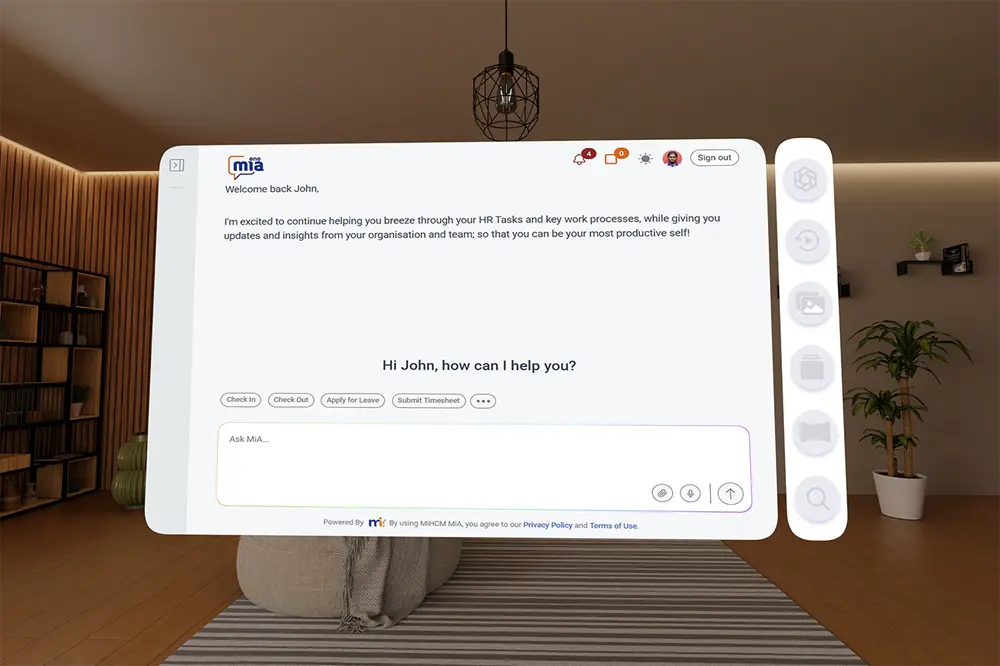
MiHCM components form a cohesive conversational stack.
- MiA ONE (conversational layer): ingests HRIS data and documents to answer queries with source citations and role-aware results; supports mobile and Teams channels.
- SmartAssist (automation): converts conversational intents into actions — start leave requests, queue approvals or create HR tickets with audit trails.
- MiHCM Data & AI + Analytics: tracks adoption, NPS, resolution times and surfaces predictions for turnover and absenteeism to measure business impact.
- MiHCM Enterprise: provide canonical records (payslips, leave, payroll) and connectors (APIs, SSO) needed for secure conversational access.
Deployments can be hybrid with tenant-dedicated boundaries, SSO, SCIM and role-based permissioning to meet compliance and data residency needs.